What is your choice of CAD program?

Started by Rledoux313 · 62 replies · 3,359 views

AVTUR
Reply #15 · 18 Sept 2026, 20:11
In my professional life I was taught to use CADD 5 although I was an aero-thermal engineer. The company believed that all engineers should have knowledge of CADs and, later, solid modelling. CADD 5 is a top of the range package only used by big engineering companies.

Before I retired, nearly 20 years ago, I bought a discounted basic TurboCads package at a model engineering show and have been faithful to it for simple drawings. However I could not understand the solid model side of the package. During the COVID lockdowns my model engineering club ran a FUSION 360 course using Zoom and, after an initial hiatus with it, I am a happy user. The non-commercial user limitations do not worry me.

:wine1: :happyreader: :wine1:

AVTUR
Charles Lamont
Reply #16 · 18 Sept 2026, 22:02
I use Onshape. There is a free plan. It works in your browser, so there is nothing to download, or update - you just log in. The user interface design is clean and modern. There is good documentation, loads of resources including tutorials and a forum. There are some innovative features that make for ease of use. You need a reasonably fast internet connection to use it. With the free plan, your work is public (but not necessarily easy to find).
uuu
Reply #17 · 19 Sept 2026, 08:10
Quote from: petertha
Quote from: uuuI use Siemens SolidEdge, which is free for hobbyists.  It's not got CAM built in.

Wilf


This came up on our local forum. My comment was I wonder why SE is not more popular among hobbyists desiring a free & powerful app along the lines of Solidworks, Inventor, F360 (but where CAM wasnt on the prerequisite list). I'm speaking more from a SolidWorks background. I would love to recommend SW Maker at $50/year which is essentially the full licence seat app, no cloud handcuffs (yay), limited file format exports (expected for non-commercial). But seems like getting at SW-Maker through the Swamp known as 3D-Experience is a royal cluster that just never seems to get rectified going on years now. At least what i glean from forums. Like every day someone says I opened Maker & it blew its brains out, not sure why, maybe an update & no longer recognizes my logon and....

Anyway, just curious if you have prior/other 3D-CAD experience to compare SE? How do you find learning resources, help forums, that kind of thing?


I had been using the 2D SolidEdge before transitioning to the 3D version.  Although building a 3D model is conceptually very different from 2D, the familiarity with the program's approach to things really helped.  I briefly tried Fusion 360 when I needed the 3D, but I preferred the familiar feel of SE.  And it works stand-alone - no internet required.    I'm also surprised that it works perfectly well on my middle-range laptop - I can have animated six cylinder four-stroke engines and it doesn't complain.

I do watch the occasional video and look up the online instructions.  But you have to ask the right question to get the right answer - and if you can frame the question in the right jargon, then you're already close to the solution.  So it can get frustrating, knowing the program must do a thing, but not not knowing which incomprehensible little symbol must be clicked, or what its proper name is.

Wilf
AVTUR
Reply #18 · 19 Sept 2026, 09:27
I have not used videos with both FUSION 360 and TurboCads, just guide books. FUSION does have a habit of changing slightly with each upgrade. I do photographic editing and the package uses instruction videos which I find a nuisance.

AVTUR
A7er
Reply #19 · 19 Sept 2026, 10:12
I mainly use the free version of Design Spark Mechanical. It has a few limitations, such as no mirror of parts and the text tool is almost non existent, but there are workarounds. I also use Solid Edge community edition. A very well featured cad package, and at the present time, free. I used FreeCad for a few years until I discovered DS and SE, and I still download and try the latest updates, and so far I have deleted them and gone back to 0.19. I only use it for simple things preferring DS and SE.
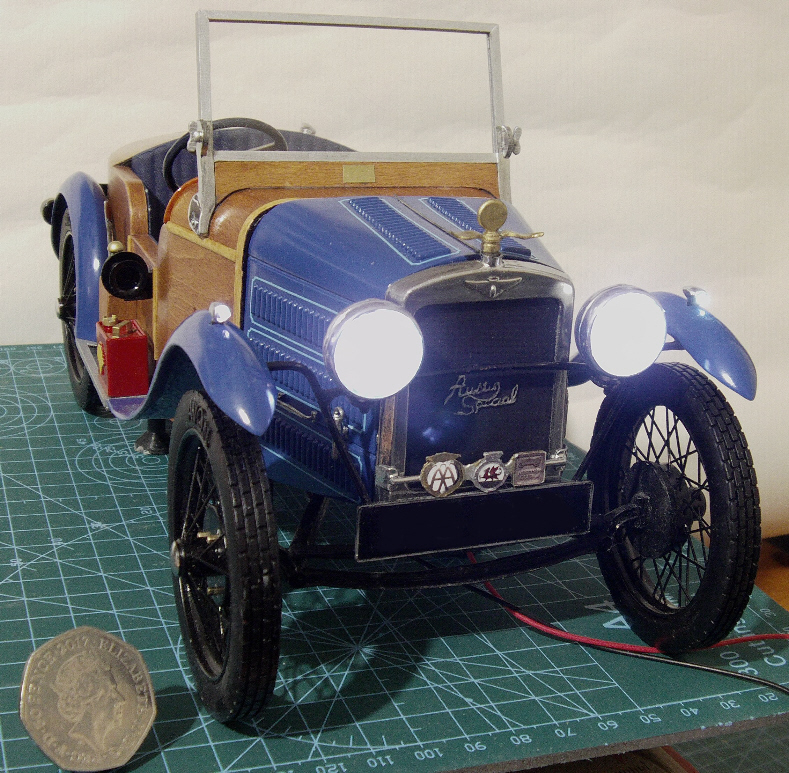
I used DS to produce the STL files to 3D print a 1/10th scale model of my 1930 Austin 7 Special.


The body is 3D printed and then covered with veneer. Not bad for a free programme!
Lee

kvom
Reply #20 · 19 Sept 2026, 10:21
As a veteran I get SolidWorks for $20/year.  I've been using it for many years.
Vixen
Reply #21 · 19 Sept 2026, 13:10
I am also a military veteran, but in the wrong Air Force (RAF not USAF). So no SolidWorks for $20/year this side of the pond. :toilet_claw:

Mike
Last edit: 19 Sept 2026, 17:00 by Vixen
Art K
Reply #22 · 19 Sept 2026, 16:59
I might as well chime in! I use Alibre Design V25. I have used Alibre since I bought my Tormach mill in 2007. Now mind you it's gone through many iterations since then. When I was thinking about buying the mill I took CAD/CAM at the local technical college and they used Master CAM. Didn't seem to transfer much to Alibre or SprutCam which was the CAM part of the mill package. I haven't changed because of the learning curve. Seems easier to muddle along than trying to learn something new.
Art
bent
Reply #23 · 20 Sept 2026, 00:25
I use Alibre at home, as others said, it's one of the better options if you just want something that works and doesn't require subscription fees and unwanted/un-needed updates.

I learned to draft on a flat surface with pencil, paper, and two triangles, and occasionally a scale, divider, compass and a French curve.  Some years later I joined a company that gave me a copy of 2D Autocad, and I used my drafting knowledge to create drawings on it, including projected views using 3rd-angle techniques (which had the kids who grew up doing 3d CAD wondering what kind of dark magic I was up to).  At the next job, I was given a seat of Solidworks, which was my first real solid modelling program.  I was allowed to take a copy home, and taught my then 6 year old to use it (he worked through the tutorials).  He grew up using Google Sketchup or some variant thereof.  Another career move and I used Autocad but in 3D version (a real PITA, they did not implement true solid modelling and you could easily create inverse-Jacobian solids, I.e. solids that computed to a negative volume, which would break the computer if you added them to regular solids).  I migrated from there to AutoCad Inventor, which was their rip-off version of SolidWorks.  Use (and still use) a version of that at work, but use Alibre at home. 

I would recommend a new user of 3d software to get free/trial versions of the big names (AutoDesk Inventor or Fusion, SolidWorks, Solid Edge) mainly to run their tutorials and learn.  Then try some of the 2nd tier versions like Alibre, Tinkercad, Onshape.  Then, and only then, should you go play with FreeCad; it's really pretty buggy and not worth the effort unless you enjoy customizing and tinkering software.
Last edit: 20 Sept 2026, 00:29 by bent
Jasonb
Reply #24 · 20 Sept 2026, 06:05
Just a note on Alibre costs.

Although all three levels of their CAD can be purchased as a one off there is the option of yearly maintenance which will get you the latest updates that include bug fixes as well as new features. Or you can pay a one off and get updated every few years which does not include the licence fee you already have.

For example if you had purchease Atom3D a couple of years ago as a one off you would have missed out on new features such as real threads. maybe unwanted by some but if you want to model items to 3D print then having a built in tool to do the threads is a big time saver over the existing "cut your own" method that had to be used.
Laurentic
Reply #25 · 20 Sept 2026, 09:28
The problem for CAD programmes, 2D or 3D, is that there seems to be a very limited choice for those who have MAC computers, most programmes only seem to be available for Microsoft users.  There also seems to be a very limited number of 2D only programmes, everyone seems to want you to start straight in with 3D, which is fine if you have that sort of mind, but for us oldies used to 2D that's a whole big new learning curve to navigate.  Especially when you were trained in Engineering Drawing at school/college with pencil on paper back in the day when the earth was young.  Can we be bothered - life is short!  Plus the ironic thing about 3D, which doesn't really want you in 2D, is that it seems that to create a 3D drawing you need to do 2D drawings, or at least sketches, first.

Due to the limitations on programmes for MAC, I use TurboCad which was good for MAC, but later versions maybe not so good, and now they have the annoying habit of versions of TC not working when you upgrade your MAC OS, so you have to buy the latest TC version.  I am sticking to an old MAC OS and old version of TC!  For now.  2D, for what I need CAD for, is enough for me.

Chris  :old:
Minh Thanh
Reply #26 · 20 Sept 2026, 11:03
Quote from: Laurentic  There also seems to be a very limited number of 2D only programmes, everyone seems to want you to start straight in with 3D, which is fine if you have that sort of mind, but for us oldies used to 2D that's a whole big new learning curve to navigate.  Especially when you were trained in Engineering Drawing at school/college with pencil on paper back in the day when the earth was young.  Can we be bothered - life is short!  Plus the ironic thing about 3D, which doesn't really want you in 2D, is that it seems that to create a 3D drawing you need to do 2D drawings, or at least sketches, first.

Chris  :old:


Personally, I hold a different view.
  In 2D drafting, when creating a component, you must first draw one of its faces, followed by the other surfaces and projections.
  3D modeling follows a similar logic but offers greater visual intuition; once a component is drawn, you can rotate it freely within 3D space to examine it from any angle....
Take a cube, for example: in 2D, you would draw one square face, construct the connecting edges from the corners, and then draw—often using dashed lines—the hidden edges to fully represent the object on a flat plane 2D . In 3D, however, you simply draw one square face and use a command like "Extrude..." (setting the depth/height equal to the edge length) to generate the complete cube. If you need to add details to another face, you simply rotate the object, select the desired surface, and proceed. Personally, I do not see a massive difference between 2D and 3D. It’s simply that 3D is more intuitive, easier to visualize, and more engaging , many other benefits
  ""If you approach it with an open mind, you’ll see just how interesting it is.""

PaulR
Reply #27 · 20 Sept 2026, 13:31
Quote from: LaurenticThe problem for CAD programmes, 2D or 3D, is that there seems to be a very limited choice for those who have MAC computers, most programmes only seem to be available for Microsoft users.  There also seems to be a very limited number of 2D only programmes, everyone seems to want you to start straight in with 3D, which is fine if you have that sort of mind, but for us oldies used to 2D that's a whole big new learning curve to navigate.  Especially when you were trained in Engineering Drawing at school/college with pencil on paper back in the day when the earth was young.  Can we be bothered - life is short!  Plus the ironic thing about 3D, which doesn't really want you in 2D, is that it seems that to create a 3D drawing you need to do 2D drawings, or at least sketches, first.

Due to the limitations on programmes for MAC, I use TurboCad which was good for MAC, but later versions maybe not so good, and now they have the annoying habit of versions of TC not working when you upgrade your MAC OS, so you have to buy the latest TC version.  I am sticking to an old MAC OS and old version of TC!  For now.  2D, for what I need CAD for, is enough for me.

Chris  :old:


LibreCAD (2D) is available for all main platforms including MAC (I use it on Linux).
Rledoux313
Reply #28 · 20 Sept 2026, 18:38
Wow, many more options to choose from than I expected. Thanks everybody for your input. After reading all of the options I think fusion may actually still be the best option for me. I am using a Mac currently, so that cuts out quite a few. I also travel a lot for work which puts me in airports and hotels where WiFi is not available or pretty much worthless, so no go for onshape.

Has anybody used fusion on an iPad? I see it’s an option, I wonder how viable it is. Maybe it would be convenient to have on an iPad for a second window even.

For fusion, when a file is read only I assume you can still use it in an assembly? Basically if I had an assembly with more than the 10 editable files does this become an issue?
crueby
Reply #29 · 20 Sept 2026, 19:45
With Fusion, be aware that it stores your designs in the cloud, but where oonly you can get at it and decide who else can see it. You can work offline, but you would need to download those files locally first, for when you are away from a good wifi connection.

Quick reply

Log in to reply.